

Pak-Bot lives in the new Producepak app
Pak-Bot is part of the new Producepak app. There is nothing separate to install or configure: if you can sign in to Producepak, you can open Pak-Bot and ask a question. This guide covers which server to use, how to install the app on your device, how to ask your first questions, how to give feedback, and what existing Farmsoft users need to know.

Step 1: open the app for your region
Producepak runs regional app servers. Use the address for your region:
| Region | App address |
|---|---|
| USA, Europe, Africa | https://app3.producepak.com |
| Australia, New Zealand, Asia | https://sydney3.producepak.com |
Sign in with your normal Producepak user account. Your account determines what Pak-Bot can show you: which sites you work at and whether you can access sales data. If you are not sure which region your business is on, ask your Producepak administrator or contact Producepak support.
Supported browsers
The Producepak app is a progressive web app (PWA), which means it runs in a modern web browser such as Chrome or Microsoft Edge on desktop computers, tablets and phones. Keep your browser up to date for the best performance.
Step 2: install the app (optional)
Because Producepak is a PWA, you can install it on your device so it opens like a normal app, with its own icon and window. To install, open the app in your browser and choose "Install app". This is supported on Android and Windows devices.
Install or use in the browser?
There is one trade-off to know about. The installed app does not allow multiple tabs at the same time. If you need several Producepak screens open together, for example an order in one tab and Pak-Bot in another, do not install the app; use it in a normal browser window instead, where you can open as many tabs as you need.
| Installed app | Browser | |
|---|---|---|
| Own icon and window | Yes | No |
| Multiple tabs at once | No | Yes |
| Best for | Single-task devices on the floor, phones, tablets | Office users switching between screens |
Step 3: ask your first question
Open Pak-Bot from inside the Producepak app. You will see a chat window with a message box at the bottom. Type a question, or press the microphone button and speak it, then send it. Pak-Bot shows a greeting with your name and returns its answer in the conversation.
Good first questions
Start with questions where you already know roughly what the answer should be. That way you can judge Pak-Bot's accuracy on your own data straight away.
- Total sales last month (if you have sales access)
- Total yellow potato in stock (change to a product you hold)
- List the 10 oldest inventory items
- Total of inventory at site Closters (change to your site)
- chart total sales to top five customers this year
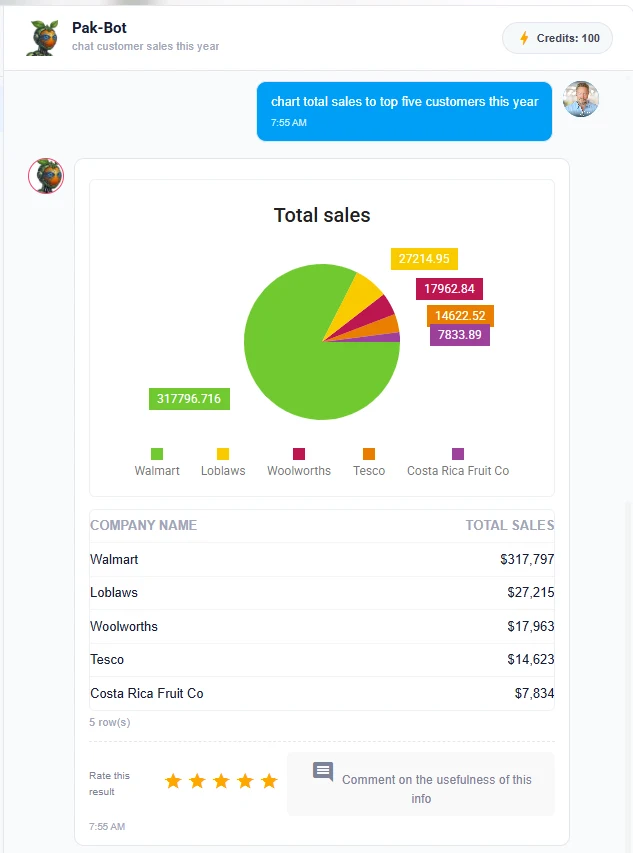
What Pak-Bot can answer today
Pak-Bot currently answers questions about inventory, sales, orders, employees, suppliers and customers, quality control and yield. It can also email and print documents, labels and ad hoc reports, generate customer labels from loaded label designs, and convert customer documents into orders. The prompt library has more than 100 examples.
Step 4: rate answers and give feedback
Under every answer there is a five-star rating and a "Comment on the usefulness of this info" box. Pak-Bot explains why this matters: "I'm still learning so feel free to give me feedback that the team will use to train me."
How to give useful feedback
- Rate every answer you use, not only the wrong ones. Good ratings tell the team what is working.
- Say what you expected. "Should only include 2 kg bags" or "Closters is a site, not a customer" is far more useful than "wrong".
- Mention your terminology. If your team uses a nickname for a product or customer, say so in the comment.
Tips for better answers
- Be specific. Name the measure, the subject and the period: "Woolworths sales of baby spinach this year".
- Use Producepak names. Customers, products and sites should match how they are set up in Producepak.
- Ask for the format. Say "chart", "list" or "total".
- Refine with follow-ups. "Show that by month", "only the top three", "as a bar chart".
- Keep confidential details out of prompts. You never need to paste passwords, bank details or contract text into Pak-Bot.
Credits
The Pak-Bot window shows a credits counter in the top-right corner. Each answer uses credits, and the counter shows how many remain on your account. If you have questions about credit allowances for your account, contact Producepak.
Moving from Farmsoft
Producepak is the new app from the team behind Farmsoft. Existing Farmsoft users can keep using the old Farmsoft system until 2028, which gives businesses time to move across at a pace that suits their season. Pak-Bot is available in the new Producepak app.
Planning the move
- Pick a quiet period. Move outside your peak packing season if you can.
- Check users and roles. Pak-Bot uses Producepak roles and site assignments, so review who has sales access and which sites each user belongs to.
- Load customer label designs. Send your customers' label specifications so that Pak-Bot can generate those labels instantly.
- Start with a pilot group. Let a few users from sales, warehouse and quality use Pak-Bot first, and collect their feedback.
For more on Farmsoft, visit farmsoft.com; for Producepak, visit producepak.com.
Rollout checklist for administrators
| Task | Why it matters |
|---|---|
| Confirm your regional server | Users need the right address: app3 or sydney3 |
| Review sales access by user | Pak-Bot returns sales data only to users with sales access |
| Assign users to sites | Pak-Bot filters answers by the sites each user works at |
| Check product, customer and site names | Clear, consistent names make prompts match more reliably |
| Load customer label designs | Enables instant customer-specific labels |
| Decide install versus browser per device | Installed app has no multiple tabs |
| Share the prompt library | Users learn faster from examples |
| Encourage ratings and comments | Feedback is used to train Pak-Bot |
Training your team
Pak-Bot needs very little training compared with traditional reporting tools, because it uses plain language. A short session is usually enough.
A 30-minute team session
- 5 minutes: show Pak-Bot answering three questions relevant to the group.
- 10 minutes: each person asks three questions about their own work.
- 5 minutes: show follow-up questions, charts, email and print.
- 5 minutes: explain permissions: what each role can and cannot see.
- 5 minutes: show how to rate and comment on answers.
Role-specific starting points
- Warehouse: inventory questions and printing stock lists.
- Sales: sales analytics and emailing results.
- Office: document to order and labels and documents.
- Quality: quality and yield.
- Management: AI reports and charts.
Your first week with Pak-Bot
A short plan for the first week helps a team build the habit of asking Pak-Bot instead of asking someone in the office.
| Day | Focus | Suggested prompts |
|---|---|---|
| Day 1 | Questions you already know the answer to | Total sales last month; total of inventory at your site |
| Day 2 | Inventory | List the 10 oldest inventory items; weight of totes in stock |
| Day 3 | Sales and orders | Sales by state last month; orders vs sales for a key customer |
| Day 4 | Charts and sharing | Chart total sales to top five customers this year; email a result to yourself |
| Day 5 | Quality and yield | Rejection rate by supplier; yield by grower |
At the end of the week, collect the prompts that worked best for each role and share them with the team.
Using Pak-Bot on different devices
Desktop and laptop
Office users usually work in the browser so they can keep several Producepak tabs open alongside Pak-Bot. Wide screens make tables and charts easy to read.
Tablets
Tablets work well for supervisors who move between the office and the floor. Installing the app on an Android tablet gives a full-screen experience.
Phones
Phones are ideal for quick questions and spoken prompts. Sales managers on the road can check a customer's sales before a meeting; supervisors can check stock from the cool room.
Shared floor devices
Make sure each user signs in with their own account, because Pak-Bot filters answers by the signed-in user's role and site. Sign out at the end of each shift.
Troubleshooting
Pak-Bot does not recognise a product or customer name
Check the name as it appears in Producepak and use that spelling. Leave a comment on the answer so the team can train Pak-Bot on your shorthand.
An answer seems to be missing a site
Pak-Bot filters by the sites assigned to your user. Ask your administrator to check your site assignments.
The app opens but I cannot open a second tab
The installed app does not support multiple tabs. Open Producepak in your browser instead.
The app is slow from my location
Check you are using the server for your region: app3 for the USA, Europe and Africa, sydney3 for Australia, New Zealand and Asia.
Getting value quickly
Businesses that get the most from Pak-Bot in the first month usually do three things. First, they nominate one person as the Pak-Bot champion, who collects good prompts, answers colleagues' questions and passes feedback to Producepak. Second, they replace one recurring report request with a Pak-Bot prompt each week, so the habit grows naturally. Third, they make rating answers part of normal use, because every rating and comment helps the Producepak team train Pak-Bot on the business's own language.
A good test of adoption after a month is simple: when someone asks the office for a number, does the answer come back as "ask Pak-Bot"? When it does, the time saved compounds every week.
What Pak-Bot does not replace
Pak-Bot is an assistant inside Producepak, not a replacement for its core workflows. Receival, packing, inspections, picking, dispatch and invoicing are still recorded through the Producepak screens and scanners designed for them. Formal documents such as invoices, bills of lading and traceability records are still produced by Producepak's standard processes. Pak-Bot makes the information from those workflows easy to reach and act on.
Keeping up with new Pak-Bot abilities
Pak-Bot is still learning, and the Producepak team adds abilities over time based on customer feedback. When a question you asked earlier did not work, try it again after a few weeks. Ask your Producepak contact about recent additions, and keep your team prompt library up to date so everyone benefits from new capabilities as soon as they are available.
Frequently asked questions
Which address should I use for the Producepak app?
Users in the USA, Europe and Africa use https://app3.producepak.com. Users in Australia, New Zealand and Asia use https://sydney3.producepak.com.
How do I install the Producepak app?
Open the app in your browser and choose "Install app". Installation is supported on Android and Windows.
Why can I not open multiple tabs in the installed app?
The installed app does not allow multiple tabs at the same time. If you need multiple tabs, use Producepak in a normal browser window instead of installing it.
How long can I keep using Farmsoft?
Existing users can keep using the old Farmsoft system until 2028.
Do I need to set up Pak-Bot separately?
No. Pak-Bot is built into the Producepak app and uses your existing Producepak account, roles and site assignments.
Can I speak to Pak-Bot instead of typing?
Yes. Use the microphone button next to the message box.
Is my data sent to ChatGPT?
No. Your business data, excluding prompts, is not sent to ChatGPT and always stays on Producepak servers. See the data security page for details.
What should I do if an answer is wrong?
Rate it and add a comment explaining what you expected. The Producepak team uses this feedback to train Pak-Bot. Then try a more specific prompt.
How do I get a demo?
Contact Producepak through the contact page at producepak.com to book a Pak-Bot demo.
Get help
For account access, regional servers, credits, label setup or migration from Farmsoft, contact Producepak. For security questions, read Pak-Bot data security first.