
What is Pak-Bot?
Pak-Bot is the generative AI assistant built into Producepak, the fresh produce management app for packers, processors, wholesalers, importers and exporters. Instead of opening a report menu, choosing filters, exporting to a spreadsheet and building a pivot table, you type a question the way you would ask a colleague. Pak-Bot reads the question, works out which Producepak data it needs, checks what you are allowed to see, and returns the answer as a table, a chart, an email, a printed document or a label.
Pak-Bot describes itself simply: "Ask me anything! I use generative A.I. reporting to answer any question you can think of, the only limit is your imagination." That is the design goal. A fresh produce business generates a huge amount of data every day: receivals from growers, pallets moving into cool rooms, packing runs, quality inspections, orders from retailers, dispatches, invoices and credits. Most of that data is never looked at because getting a specific answer out of it takes too long. Pak-Bot removes that delay.
Pak-Bot is not a separate product you have to integrate. It lives inside the Producepak app, uses the same login, the same user permissions and the same live data as the rest of the system. If your team already records receivals, packing, quality and sales in Producepak, Pak-Bot can answer questions about all of it from day one.
Why fresh produce businesses need an AI assistant
Fresh produce is not like other inventory. Product loses value every hour it sits in a cool room. Prices move daily. Retailers change orders at the last minute. Growers want to know how their fruit packed out. Auditors want traceability records within hours, not days. Every one of these situations creates a question that needs an answer quickly, and in most packhouses the person who needs the answer is not the person who knows how to run the report.
The reporting bottleneck
In a typical fresh produce company, a handful of people know how to get data out of the system. A sales manager who wants to compare this month's baby spinach sales to Woolworths against last month has to ask someone in the office, wait for a spreadsheet, then ask a follow-up question and wait again. A warehouse supervisor who wants to know which pallets are the oldest has to walk the cool room or scroll through a long stock list. A general manager preparing for a board meeting spends an afternoon building charts by hand.
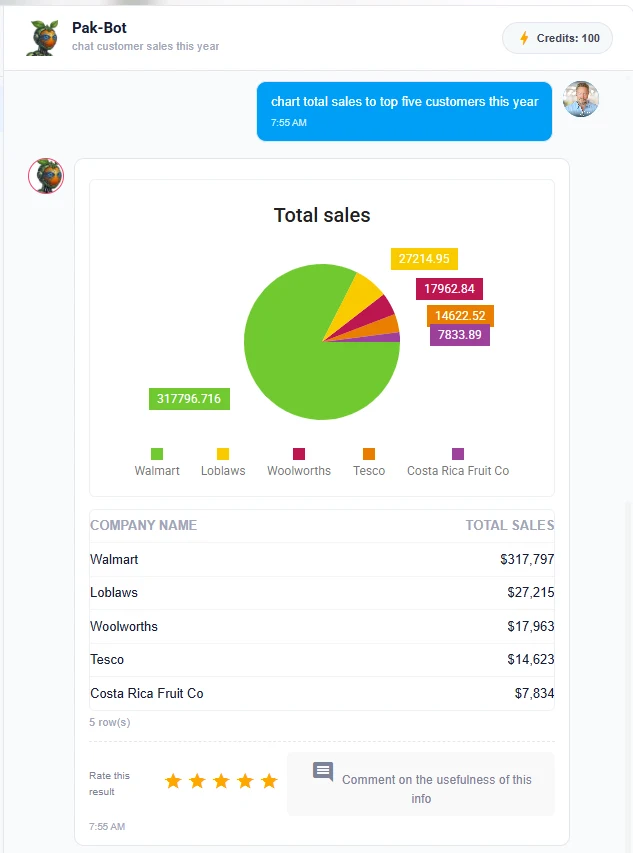
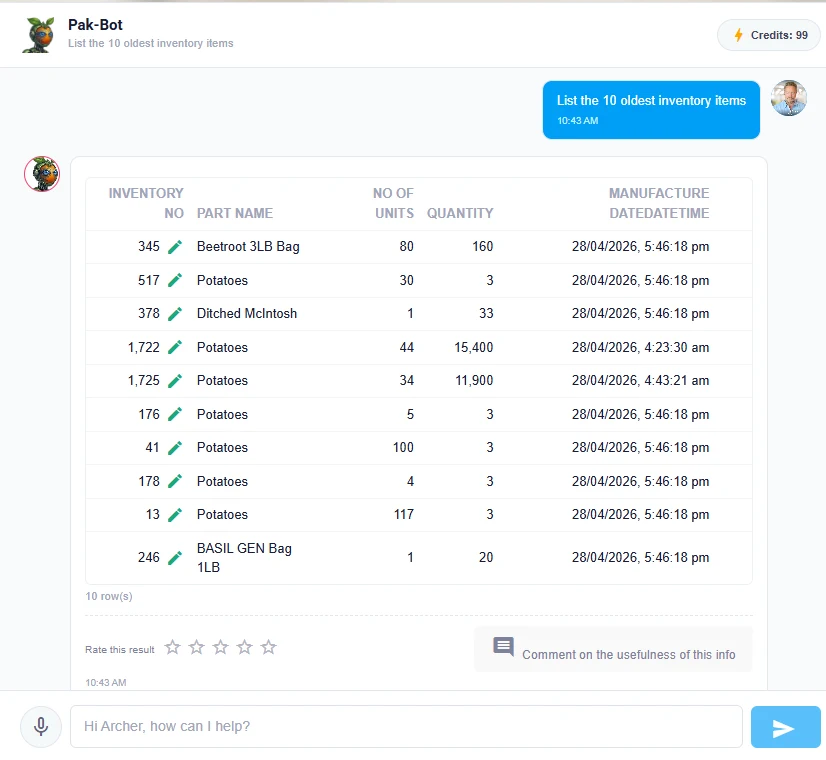
Pak-Bot turns each of those requests into a single sentence. The sales manager types Woolworths sales of baby spinach this year. The supervisor types List the 10 oldest inventory items. The general manager types chart total sales to top five customers this year. Each answer arrives in seconds, and each follow-up question is just another sentence.
Decisions that cannot wait
Fresh produce decisions have short windows. If a pallet of berries is approaching the end of its shelf life, it needs to be sold today, not after the weekly stock report. If a supplier's quality has dropped over the last three deliveries, buyers need to know before the next delivery is accepted. If a retailer's orders are running behind what was actually shipped, the account manager needs to see that before the customer does. Pak-Bot puts the answer in front of the person making the decision, at the moment they need it.
What Pak-Bot can answer today
Pak-Bot currently answers questions about inventory, sales, orders, employees, suppliers and customers, quality control and yield. That covers most of the day-to-day questions in a packhouse, distribution centre or produce wholesale business. Each area has its own page on this site with detailed examples, but here is an overview.
Inventory
Stock on hand by product, site, packaging type or owner. Oldest stock first. Weight of totes, bins or pallets in store. Consigned inventory owned by a grower group. Inventory questions.
Sales
Sales by customer, product, period, state or salesperson. Top customers. Year-on-year comparisons. Orders versus sales. Sales analytics.
Orders
Open orders, late orders, orders by customer or delivery date, and conversion of customer purchase order documents into sales orders. Document to order.
Quality and yield
Inspection results, rejection rates, supplier quality trends and packout yield by grower, line or product. Quality and yield.
People and partners
Employees by site, suppliers and customers, and the activity linked to each one, filtered by what your role allows you to see.
Labels and documents
Customer-specific labels generated instantly, plus documents and reports emailed or printed from a prompt. Labels, email and print.
How Pak-Bot works
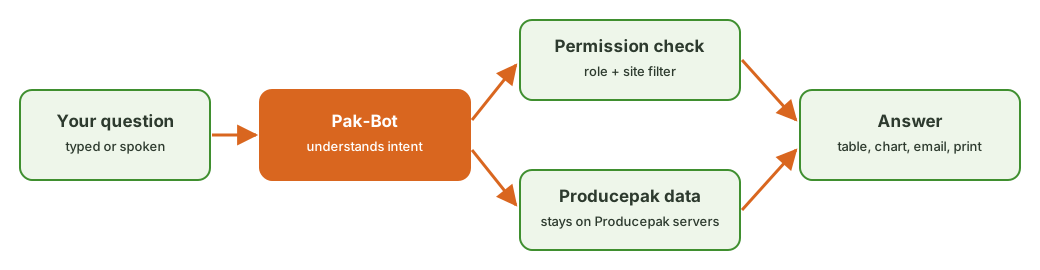
Pak-Bot combines a large language model with the structure of the Producepak database. When you ask a question, the language model works out what you mean: which products, which customers, which period, which measure. Pak-Bot then builds a query against your Producepak data, applies your user permissions and site restrictions, and returns the result. If you asked for a chart, it draws one. If you asked for an email, it sends one. If you asked for a printed document or label, it sends it to the printer.
Plain language in, structured answers out
You do not need to know table names, field names or report codes. "Total yellow potato in stock", "Weight of totes in stock" and "Red onion in poly bags" are all valid questions. Pak-Bot understands product names, customer names, site names, date ranges such as "last month", "Q1" or "this year", and measures such as weight, units, value and count.
Typed or spoken
The Pak-Bot chat box includes a microphone button, so users on the packing floor or in the cool room can speak a question instead of typing it. This matters in environments where people wear gloves, carry scanners or are working away from a desk.
Rated answers that improve over time
Every answer has a five-star rating and a comment box. Pak-Bot says it directly: "I'm still learning so feel free to give me feedback that the team will use to train me." The Producepak team reviews ratings and comments and uses them to improve how Pak-Bot interprets questions, which fields it uses and how it presents results. Your feedback makes Pak-Bot better at your business's vocabulary.
Security built in from the start
An AI that can answer any question is only useful if it answers the right questions for the right people. Pak-Bot knows which employees can access sales data and which employees work at which site, so its answers are filtered automatically. A warehouse lead at one site sees inventory for that site; a sales manager sees sales; a general manager sees the whole business. Nobody needs to configure a separate permission system for the AI.
Your business data (excluding the text of your prompts) is not sent to ChatGPT and always stays on Producepak servers. The language model helps interpret the question; the data itself is queried and returned inside Producepak. Read more on the Pak-Bot data security page.
More than reports: actions from a prompt
Pak-Bot does not stop at showing you numbers. Pak-Bot can email and print documents, labels and instant ad hoc reports at any time. That turns many routine office tasks into one-line requests.
- Email a report: Email Angela Coles sales from Q1 sends the Q1 sales result to Angela without anyone exporting a file.
- Print labels: once your customers' label designs are loaded into Producepak, Pak-Bot generates those labels instantly. There is no need to open the label designer.
- Print documents: stock lists, order summaries and reports can be printed directly from the chat.
The labels, email and print page explains how customer label templates are set up and how printing works on the packing floor.
Turning customer documents into orders
Retailers, food service companies and wholesalers send purchase orders in every format imaginable: PDF attachments, spreadsheet exports, email bodies and even photographs of paper order forms. Keying those orders into a system is slow and error-prone, and an error in a fresh produce order means the wrong product, the wrong pack size or the wrong quantity on a truck.
Pak-Bot converts documents into orders. It reads the customer document, identifies the products, quantities, pack sizes and delivery dates, matches them to your Producepak product list and customer, and creates a draft sales order for your team to check and confirm. See document to order for the full workflow.
Who uses Pak-Bot
Owners and general managers
Get a view of the business without waiting for month-end reports. Ask for total sales last month, sales by state, the top customers this year or a comparison of orders against sales for a key retailer.
Sales and account managers
Prepare for customer meetings in minutes. Ask for a customer's sales by product this year, then chart it. Check whether a retailer's orders are being filled in full. Email the result to the customer's buyer or to your own manager.
Warehouse and cool room supervisors
Find the oldest stock, the stock at a particular site, the weight of totes in store or the inventory owned by a particular grower group. Plan picking and dispatch around what is actually on hand.
Quality managers
Ask for inspection results by supplier or product, rejection rates over a period and yield by grower. Spot trends before they become claims or retailer complaints.
Administrators and office staff
Let Pak-Bot read purchase orders, send reports by email and print labels and documents, so administrative time goes into exceptions rather than repetitive keying.
Pak-Bot and the rest of Producepak
Pak-Bot is only as good as the data behind it, and Producepak is designed to capture fresh produce data accurately at every step. Producepak covers receival and inventory, packing and production, quality inspection, traceability and recalls, order picking and dispatch, logistics, invoicing and grower payments. It produces labels, bills of lading, invoices, picking lists and export documents automatically, and it connects to accounting systems including Xero, QuickBooks, MYOB and Sage. Because every pallet, tote and carton is tracked from grower to customer, Pak-Bot can answer questions that cut across the whole chain.
That connected data is what makes questions like "Totals of inventory owned by ACE Farming Group" or "Walmart orders vs sales Q1 2026" possible. The answer depends on inventory ownership, order lines, shipped quantities and customer records all living in one system. Learn more about the full platform at producepak.com and farmsoft.com.
Getting started with Pak-Bot
Pak-Bot is part of the new Producepak app. Users in the USA, Europe and Africa use the app at app3.producepak.com; users in Australia, New Zealand and Asia use sydney3.producepak.com. The app is a progressive web app, which means it runs in a browser and can also be installed on Android and Windows devices with the "Install app" option. Existing Farmsoft users can keep using the old Farmsoft system until 2028 while they move across. The getting started guide covers installation, regions and frequently asked questions.
Tips for your first questions
Pak-Bot works best with short, specific questions. Name the thing you are measuring, the filter and the period. "Total sales last month" is better than "how did we go". "Woolworths sales of baby spinach this year" is better than "spinach numbers". If the first answer is not quite right, ask a follow-up or rephrase, and use the rating stars and comment box to tell the team what you expected. The prompt library has more than 100 examples you can copy and adapt.
- Total sales last month
- Sales by state last month
- Total yellow potato in stock
- Total of inventory at site Closters
- Walmart orders vs sales Q1 2026
Frequently asked questions
Is Pak-Bot an extra product I need to buy and integrate?
No. Pak-Bot is built into the Producepak app and uses the same login, permissions and data. There is no separate integration project.
Does Pak-Bot send my business data to ChatGPT?
No. Your business data, excluding the text of your prompts, is not sent to ChatGPT and always stays on Producepak servers.
Can Pak-Bot show sales data to warehouse staff?
Only if their role allows it. Pak-Bot knows which employees can access sales data and which sites each employee works at, and filters answers accordingly.
What if Pak-Bot gives the wrong answer?
Rate the answer and add a comment explaining what you expected. The Producepak team uses this feedback to train Pak-Bot. You can also rephrase the question with a more specific product, customer, site or date range.
Which subjects can Pak-Bot answer questions about?
Currently inventory, sales, orders, employees, suppliers and customers, quality control and yield. Pak-Bot can also email and print documents, labels and ad hoc reports.