

Why AI security matters in fresh produce
A fresh produce business holds commercially sensitive information: customer prices and volumes, grower payments, margins by product, supplier performance, employee details and retailer program terms. In the wrong hands, that information affects negotiations with customers and growers, and it can damage relationships that took years to build. Any tool that makes data easier to reach must also make sure it only reaches the right people.
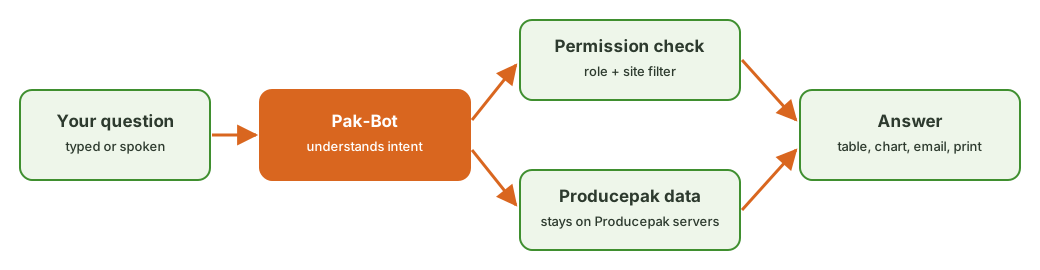
Pak-Bot was built with that requirement from the start. It uses the same user accounts, roles and site assignments as the rest of Producepak, it filters every answer by those permissions, and it keeps your business data on Producepak servers rather than handing it to an outside AI service.
Your data stays on Producepak servers
The Pak-Bot guide states it directly: "Your data (excluding prompts) is NOT being sent to ChatGPT and always stays on Producepak servers."
Here is what that means in practice. When you ask Pak-Bot a question, a large language model is used to understand the question: which measure, which products, which customers, which period. The text of your prompt is used for that interpretation. The data that answers the question (your inventory records, sales, orders, quality results and so on) is queried and returned inside Producepak. The rows of your database are not uploaded to ChatGPT to be analysed.
What this protects
- Customer and pricing data is not exposed to an external AI provider as part of answering a question.
- Grower and supplier data, including payments and performance, remains within Producepak.
- Employee data remains within Producepak.
What to keep in mind about prompts
Because the prompt text is used by the language model to interpret your question, treat prompts as you would any message sent through an online service. Ask "Woolworths sales of baby spinach this year", which contains names but not confidential figures. Avoid pasting confidential information, such as bank details, passwords or full contract text, into a prompt. There is no need to: Pak-Bot gets the figures from your database.
Role-based access: who can see sales data
Not everyone in a fresh produce business should see sales figures. Packing floor staff, cool room operators and drivers need inventory and order information but not customer revenue. Pak-Bot knows which employees can access sales data.
When a user without sales access asks a sales question, Pak-Bot does not return sales figures. When a user with sales access asks the same question, they get the answer. The rules come from Producepak user settings, so there is no separate AI permission system to maintain and no risk of the two getting out of sync.
Why this matters for an AI assistant
Traditional reports have permissions attached to each report: a user either can or cannot open the sales report. An AI assistant that can answer any question needs permissions on the data, not just on fixed reports. Otherwise, a user could ask a cleverly worded question and retrieve information they were never meant to see. Pak-Bot applies permissions to the data it retrieves, regardless of how the question is phrased.
Site-based filtering
Many fresh produce businesses operate several sites: packhouses in different growing regions, cool stores, distribution centres and sales offices. Staff usually work at one site and should see that site's data. Pak-Bot knows which employees work at which site, and filters answers by site automatically.
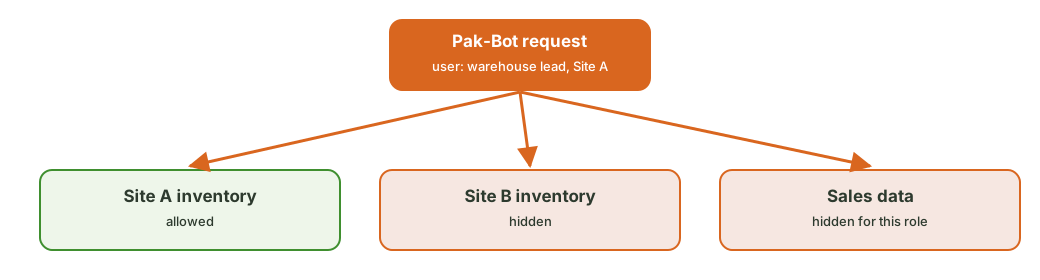
A supervisor at one site who asks "Total of inventory" gets that site's total. A regional manager with access to several sites gets those sites. A general manager with access to everything sees the whole business. Nobody has to remember to add a site filter, and nobody can remove one to see more than they should.
Permissions example
| User | Sites | Sales access | Prompt | What Pak-Bot returns |
|---|---|---|---|---|
| Cool room supervisor | Site A | No | Total yellow potato in stock | Yellow potato stock at Site A |
| Cool room supervisor | Site A | No | Total sales last month | No sales figures |
| Sales manager | All | Yes | Sales by state last month | Sales by state for the whole business |
| Regional manager | Sites A and B | Yes | Total yellow potato in stock | Yellow potato stock at Sites A and B |
This table is an illustration of how role and site rules combine. Actual roles depend on how users are configured in your Producepak account.
Actions follow the same rules
Pak-Bot can email and print documents, labels and reports. Those actions follow the same permission rules as on-screen answers. If a user cannot see a piece of data, they cannot email or print it through Pak-Bot either, because Pak-Bot never retrieves it for them. See labels, email and print.
Regional servers
Producepak runs regional app servers. Users in the USA, Europe and Africa use app3.producepak.com. Users in Australia, New Zealand and Asia use sydney3.producepak.com. Using the server for your region keeps response times low and keeps your data hosted in the region Producepak has assigned to your account. If you are unsure which server your business uses, contact Producepak support.
Human feedback and review
Each Pak-Bot answer has a star rating and a comment box. Pak-Bot explains: "I'm still learning so feel free to give me feedback that the team will use to train me." The Producepak team reviews this feedback to improve how Pak-Bot interprets questions. This process improves accuracy over time, and it means a human team is looking at how Pak-Bot is performing rather than leaving it to run unchecked.
Accuracy is part of security
A wrong answer used for a business decision can do as much damage as a data leak. Pak-Bot reduces this risk by querying real data rather than generating numbers, showing the rows behind each chart, and collecting feedback on answers that are wrong. For formal financial reporting, confirm figures against the standard Producepak reports or your accounting system.
Good practice for administrators
Pak-Bot inherits its permissions from Producepak user settings, so the quality of those settings matters. Administrators should:
- Review roles before rollout. Check which users have sales access and whether each one needs it.
- Assign sites correctly. Make sure each user is linked to the sites they work at, so site filtering works as intended.
- Remove leavers promptly. Disable accounts when staff leave. This applies to all of Producepak, and Pak-Bot follows automatically.
- Use individual accounts. Shared logins make it impossible to apply the right permissions to the right person.
- Train staff on prompts. Remind users not to paste confidential information such as passwords or banking details into prompts.
Security and the wider Producepak platform
Pak-Bot sits inside Producepak, which already handles sensitive business processes: traceability records, grower payments, invoicing and integration with accounting systems including Xero, QuickBooks, MYOB and Sage. The same account controls that protect those processes protect Pak-Bot. The app is delivered as a progressive web app over HTTPS, and users sign in to the same Producepak account whether they use the browser or the installed app.
Traceability records
Fresh produce businesses subject to the FDA Food Traceability Rule (FSMA section 204) must be able to provide traceability records to the FDA within 24 hours of a request. Accurate, access-controlled records serve both compliance and security. Pak-Bot can help staff find traceability information quickly while keeping that information within the right roles.
Questions to ask any AI vendor
If you are comparing AI tools for a fresh produce business, these questions help separate secure designs from risky ones. Pak-Bot's answers are shown for reference.
| Question | Pak-Bot |
|---|---|
| Is my business data uploaded to a public AI service to be analysed? | No. Data, excluding prompts, stays on Producepak servers. |
| Does the AI respect existing user permissions? | Yes. It knows which employees can access sales data. |
| Does the AI filter by site or business unit? | Yes. It knows which site each employee works at. |
| Are numbers generated by the model or queried from my data? | Queried from Producepak data. |
| Can users rate wrong answers? | Yes. Star ratings and comments on every answer. |
| Do emails and prints follow the same permissions? | Yes. Pak-Bot only retrieves data the user may see. |
Why "data stays on our servers" matters for AI
Many AI tools work by uploading your files or database exports to a general-purpose AI service, which then reads the data and writes an answer. That approach is quick to build, but it has three problems for a business with sensitive commercial data.
- Exposure: full datasets leave your systems every time a question is asked, including data unrelated to the question.
- Control: once data is in a third-party service, you depend on that service's retention, training and access policies.
- Accuracy: when a language model reads raw rows and summarises them, it can miscount, round or invent figures, especially with large tables.
Pak-Bot avoids all three. The language model interprets the question; Producepak runs the query against its own database and returns the result. The figures come from your records, and your records stay on Producepak servers.
Threats Pak-Bot is designed to resist
Curious insiders
Most data exposure inside a business is not malicious; it is someone seeing information they did not need. A packer who stumbles across customer prices, or a site worker who sees another site's results, can create awkward conversations. Role and site filtering stop this by default.
Cleverly worded questions
Because Pak-Bot accepts any question, a user might try to phrase a request to get around restrictions, for example by asking for "the value of shipped orders" instead of "sales". Pak-Bot applies permissions to the data retrieved, not to the wording of the question, so rephrasing does not unlock restricted data.
Forwarded results
Results emailed through Pak-Bot are produced under the requesting user's permissions. A user cannot use Pak-Bot to email themselves data they are not allowed to see. What happens after an email is received is governed by your normal email policies.
Shared devices
Packing floor devices are often shared. Make sure users sign in with their own accounts and sign out at the end of a shift, so that Pak-Bot answers reflect the right person's permissions. Where shared devices are unavoidable, give the shared account the minimum access it needs.
Privacy for employees
Pak-Bot can answer questions about employees, such as which employees work at a site or which orders were entered by whom. These questions follow the same permission rules as all other data. Businesses should apply their usual privacy policies to employee information, and limit employee-related access to the managers who need it.
Security checklist before rollout
- Every user has an individual Producepak login.
- Sales access is limited to people who need it.
- Each user is assigned to the correct sites.
- Leavers are disabled the day they leave.
- Shared floor devices are signed out at the end of each shift.
- Staff know not to paste passwords, bank details or contract text into prompts.
- Managers check external emails on screen before asking Pak-Bot to send them.
These steps take an administrator less than an hour for most businesses and they protect every part of Producepak, not only Pak-Bot.
Security FAQ
Is my data sent to ChatGPT?
No. Your business data, excluding prompts, is not sent to ChatGPT and always stays on Producepak servers.
Is the text of my question sent anywhere?
The prompt text is used by the language model to interpret your question. Avoid including confidential information such as passwords or bank details in prompts.
Can a packing floor employee see sales figures through Pak-Bot?
Only if their Producepak role includes sales access. Pak-Bot knows which employees can access sales data.
Can users see data from other sites?
Only sites they are assigned to. Pak-Bot knows which employees work at which site and filters answers accordingly.
Do I need to set up separate permissions for Pak-Bot?
No. Pak-Bot uses the user roles and site assignments already configured in Producepak.
Related pages
Read the getting started guide, see what Pak-Bot can do with inventory and sales, or contact Producepak with security questions.