

How to use this prompt library
Pak-Bot answers questions written in plain language, so there is no special syntax to learn. Still, some prompts work better than others, and it helps to see examples. This library collects more than 100 example prompts for fresh produce businesses, grouped by topic. The first ten come straight from the Pak-Bot guide supplied with Producepak; the rest follow the same patterns.
To use a prompt, copy it into the Pak-Bot chat box and change the customer, product, site, grower or period to match your business. Names should match how records are set up in your Producepak account. Pak-Bot only returns data your role and site allow you to see, so some prompts (sales prompts, for example) will only work for users with the right access.
The ten starter prompts
These ten prompts appear in the Pak-Bot guide. They are a good first test of Pak-Bot on your own data.
- Email Angela Coles sales from Q1
- Woolworths sales of baby spinach this year
- Total sales last month
- Sales by state last month
- Total yellow potato in stock
- Weight of totes in stock
- Totals of inventory owned by ACE Farming Group
- Total of inventory at site Closters
- Walmart orders vs sales Q1 2026
- Red onion in poly bags
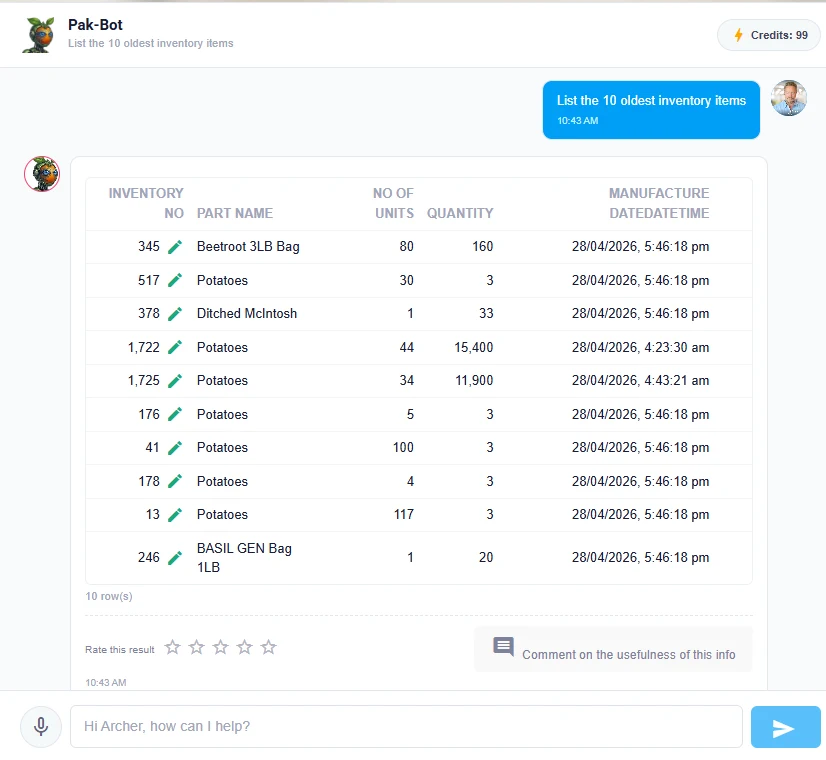
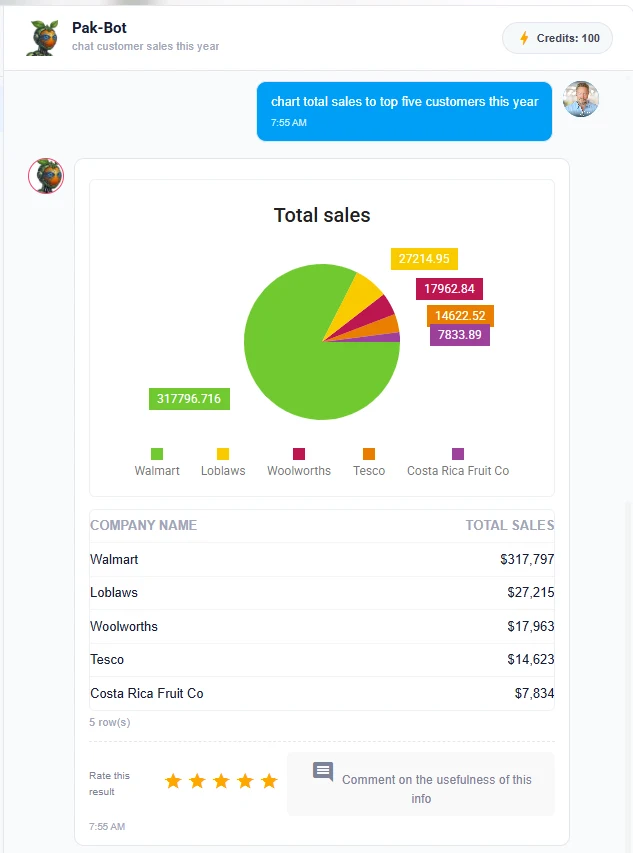
Two more prompts are shown in Pak-Bot screenshots: chart total sales to top five customers this year and List the 10 oldest inventory items.
Anatomy of a good prompt
The most reliable prompts contain some or all of these parts:
| Part | Examples |
|---|---|
| Action | chart, list, total, compare, email, print |
| Measure | sales, units, weight, value, yield, rejection rate, orders |
| Subject | a product, customer, grower, supplier, site or packaging type |
| Breakdown | by customer, by product, by state, by site, by week |
| Period | today, last week, last month, Q1 2026, this year |
"Chart sales of avocados by customer last month" contains all five. Short prompts work too ("Total sales last month"), because Pak-Bot fills sensible defaults.
Inventory prompts
- Total yellow potato in stock
- Weight of totes in stock
- Red onion in poly bags
- List the 10 oldest inventory items
- Total of inventory at site Closters
- Totals of inventory owned by ACE Farming Group
- Inventory older than 5 days
- Stock expiring this week
- Chart inventory by product group
- Chart inventory weight by site
- Number of pallets of avocados in stock
- Potatoes in bins waiting to be packed
- Oldest leafy greens in stock
- Inventory by owner
More detail: AI inventory answers.
Sales prompts
- Total sales last month
- Total sales this year compared to last year
- Sales by state last month
- Woolworths sales of baby spinach this year
- chart total sales to top five customers this year
- Top 10 products by sales value this year
- Slowest-selling products this quarter
- Chart Loblaws sales by month this year
- Tesco sales by product last quarter
- Sales by salesperson last month
- Avocado sales by state this year
- Customers with lower sales this month than last month
More detail: sales analytics.
Order prompts
- Walmart orders vs sales Q1 2026
- Open orders for tomorrow
- Orders not yet picked for today
- Which Walmart orders were short-shipped in Q1 2026?
- Orders vs sales by customer last month
- Number of orders by customer this week
- Products with the biggest gap between ordered and shipped this month
- Largest orders this month
- Orders for delivery to site Closters this week
- Average order size by customer this year
Pak-Bot can also convert customer purchase order documents into sales orders. See document to order.
Quality control prompts
- Rejection rate by supplier this quarter
- Quality inspections that failed yesterday
- Most common defects in tomatoes this month
- Chart average quality score by grower this season
- Inspection results for lot 4471
- Suppliers with more than two rejected loads this month
- Failed finished-goods inspections last week
- Receival temperature failures this month
- Corrective actions opened this month
- Quality score trend for baby spinach by week
Yield prompts
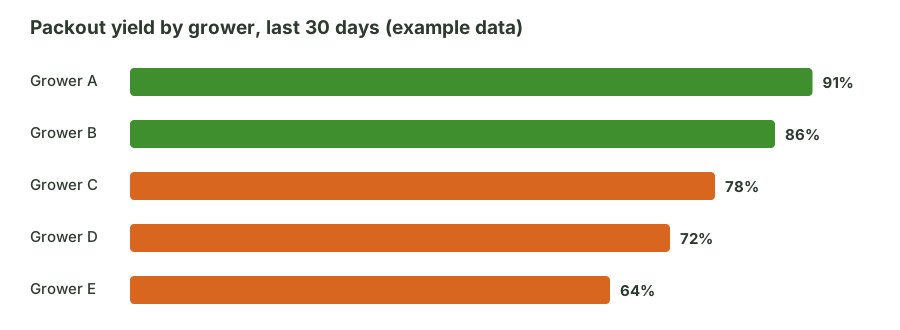
- Chart yield by grower last 30 days
- Average packout for avocados this month
- Yield by packing line this week
- Yield by packing line yesterday
- Lots with yield below 75 percent this month
- Waste by product last quarter
- Baby spinach yield by week Q1 2026
- Second-grade percentage by grower this season
- Best and worst yielding lots this week
More detail: quality and yield.
Supplier, grower and customer prompts
- Top 10 suppliers by weight received this year
- Growers who delivered this week
- Weight received from ACE Farming Group by month
- New customers this quarter
- Customers who have not ordered in 30 days
- Products bought by Costa Rica Fruit Co this year
- Suppliers of red onion this season
- Customers by state
Employee prompts
Pak-Bot knows which employees work at which site and which employees can access sales data. Employee prompts follow the same permission rules.
- Employees at site Closters
- Angela Coles sales from Q1
- Orders entered by each employee this week
- Inspections completed by each inspector this month
- Number of employees by site
Email and print prompts
- Email Angela Coles sales from Q1
- Email total sales last week by customer to the management team
- Email inventory owned by ACE Farming Group to their grower contact
- Email the 10 oldest inventory items to the warehouse supervisor
- Email Walmart orders vs sales Q1 2026 to me
- Print the 10 oldest inventory items
- Print total of inventory at site Closters
- Print sales by state last month
- Print yield by packing line yesterday
Label prompts
Once your customers' label designs are loaded into Producepak, Pak-Bot can generate those labels instantly, with no need to use the label designer.
- Print 40 Walmart labels for baby spinach 120 g
- Print Woolworths carton labels for today's red onion run
- Print pallet labels for order 10234
- Reprint labels for lot 4471
More detail: labels, email and print.
Chart prompts
- chart total sales to top five customers this year
- Chart sales by state last month
- Chart weekly sales to Tesco this year as a line chart
- Chart inventory by owner
- Chart rejection rate by supplier this quarter
- Show that as a bar chart
- Same chart by month instead
Prompt workflows: chains of questions
The best use of Pak-Bot is often a short chain of questions, each building on the last.
Morning stock check (warehouse)
- Total of inventory at site Closters
- List the 10 oldest inventory items
- Print the 10 oldest inventory items
Customer review preparation (sales)
- Walmart orders vs sales Q1 2026
- Which Walmart orders were short-shipped in Q1 2026?
- Email Walmart orders vs sales Q1 2026 to me
Supplier investigation (quality)
- Rejection rate by supplier this quarter
- Most common defects for the worst supplier this quarter
- Chart that supplier's rejection rate by week
Adapting prompts to your business
The prompts on this page use example names: Angela Coles, ACE Farming Group, site Closters, Woolworths, Walmart, Loblaws, Tesco and Costa Rica Fruit Co. Replace them with your own people, growers, sites and customers. Products should also match your catalogue. If you pack berries rather than potatoes, "Total yellow potato in stock" becomes "Total strawberries in stock" or "Total blueberries in 125 g punnets in stock". The structure of the prompt stays the same; only the names change.
Periods can be adapted too. Replace "this year" with "this season", "last month" with "last week", or "Q1 2026" with an exact date range such as "1 March to 15 April". Explicit dates are the safest choice when a period could be read in more than one way, for example when your financial year does not start in January.
Building your own prompt library
Start a shared document with three columns: role, prompt and what the answer is used for. Add the prompts from this page that apply to your business, rename them with your own customers, products and sites, and test each one. Remove any that do not suit your operation. Add new prompts as people discover them. After a season, the list becomes a practical reference of how your business uses data, and a quick way for new staff to learn which questions matter.
A good library is short enough to read in a few minutes. Ten to fifteen prompts per role is usually enough. Mark the prompts people use daily so new users know where to start, and review the list at the start of each season when products, customers and programs change.
Prompts for the end of the season
- Total weight received by grower this season
- Sales by product this season compared with last season
- Chart weekly packing volume this season
- Average yield by grower this season
- Customer rejections by product this season
When a prompt does not work
- Check names. Customer, product and site names should match Producepak records.
- Add a period. "Sales of avocados" is open-ended; "sales of avocados last month" is not.
- Split complex questions. Ask one thing at a time and build up.
- Check permissions. Without sales access, sales prompts will not return figures.
- Leave feedback. Rate the answer and say in the comment what you expected. The Producepak team uses this feedback to train Pak-Bot.
Prompt FAQ
Do I need to type prompts exactly as written here?
No. Pak-Bot understands natural language. These examples show patterns that work well; change the wording and names to suit your business.
Can I speak prompts instead of typing them?
Yes. The Pak-Bot chat box has a microphone button for spoken questions.
Why did a sales prompt return no figures?
Pak-Bot only returns sales data to employees whose Producepak role includes sales access.
Prompts by role
The categories above are organised by subject. Many people find it easier to start from their own role. Here are suggested starting sets.
Owner or general manager
- Total sales this month compared to last month
- Chart sales by customer this year
- Chart inventory weight by site
- Waste by product last month
- Share of sales from the top customer this year
Sales manager
- Sales by customer last week
- Customers whose sales grew this year
- Sales of red onion by week this season compared with last season
- Orders vs sales by customer last week
Warehouse and dispatch
- Orders for delivery tomorrow by customer
- Stock available for today's orders
- Pallets in stock by product
- Inventory from lot 4471 by site
Quality and food safety
- Inspections not completed yesterday
- Customer rejections this month by product
- Which customers received product from lot 4471?
Grower relations and purchasing
- Yield by lot for ACE Farming Group this season
- Rejected loads by grower this season
- Average quality score for ACE Farming Group by month
Words that change the answer
Small words in a prompt can change the result significantly. Knowing them helps you get exactly what you want.
| Word or phrase | Effect | Example |
|---|---|---|
| total | Returns a single figure | Total sales last month |
| by ... | Breaks the result down | Sales by state last month |
| chart | Returns a chart and table | Chart sales by state last month |
| list | Returns rows of detail | List the 10 oldest inventory items |
| top / oldest / largest | Sorts and limits | Top 10 products by sales value |
| vs / compared to | Compares two measures or periods | Walmart orders vs sales Q1 2026 |
| email / print | Sends the result | Email Angela Coles sales from Q1 |
Sharing prompts across your team
Once your team finds prompts that work well for your business, keep them. A shared list of the best prompts for each role, with your own customer, product and site names, is one of the fastest ways to bring new staff up to speed. Review the list every season, add new prompts that people discover, and remove ones that are no longer useful. When a prompt consistently gives the wrong answer, rate it and leave a comment so the Producepak team can train Pak-Bot to handle it.
Ready to try them? Read the getting started guide, or book a demo to test these prompts on data that looks like your operation.